We build Compelling so that agents can do the research, list building and enrichment that GTM teams used to do by hand. In our own company, the system where agents worked worst was our website.
It lived in Framer. Framer is a good design tool, and the site looked the way we wanted. Agents could work on it: first through a community MCP plugin that needed an open editor tab, then through Framer’s agent CLI, and since October through an official MCP server. We used them, and it never felt right: I want to review an agent’s work the way I review everyone else’s, in a pull request.
An agent can only change a website safely when the person who asked can review what changed. For a team that doesn’t read diffs, the Framer canvas is that review, and a good one. We read diffs every day, so for us the canvas added a step in front of the review we already had.
So we rebuilt the site as code. Since November 11, every page on this domain comes from a Git repository, and almost every commit to it was co-written by an agent.
The new site is built with Astro as plain static HTML. Every page is a typed Markdown or JSON file in the repository, hosted on Vercel. With no server runtime, the host stays a deployment target: moving it would take an afternoon.
5 lessons from the move
1. Make the old URL list your acceptance test
We pulled every URL from the Framer sitemaps. Every one had to answer on the new site with the same status code, canonical, hreflang and lang. Before the switch, a script requested all of them from a local build with the production configuration and compared them against the live site. After the switch, it ran again against the live domain.
Takeaway: Write the parity check before you migrate anything. It is the only definition of “done” nobody can argue with.
2. Export collections, then check per collection
Framer content is templated: glossary terms, blog posts, legal pages. We exported each collection as data and wrote one field mapping per type. The full content was out of Framer on the first evening.
Templated content fails per collection. If the mapping for one type is wrong, every item of that type is wrong in the same way. So instead of comparing every item by eye, a script measures how much of the Framer source text ends up in each file. Items that score below the rest of their collection are where the template did not fit, and those are the only ones we read one by one.
Takeaway: Read the outliers, not the pages.
3. Compare Framer’s export against the live HTML
The export is complete, but four things in it are easy to misread. None of them shows up as an error message.
- Rich text is a node tree. Turning a field into a string gives you garbage. The source of truth for bodies is the localization data of each item.
- Pages are stacks of component instances. The page tree gives you order and page-level text, but the copy inside each instance lives in the component definition. The localization groups have the full copy without structure. You need both: order from the tree, copy from the groups.
- Rich blocks come out flat. Tables, calculators and embedded videos need to be rebuilt. We took their structure from the live HTML.
- Links to drafts are rewritten on publish. When a page links to a draft, Framer points the published link at the homepage. The source still holds the original target, so an export from the source brings those links back.
Takeaway: The live HTML is the reference. The export is the raw material.
4. Turn every rule into a check, design included
The rules we used to keep in our heads are now in the linter:
- Product names (Free, Founder, Growth, Scale, Enterprise, Credits, Insights) are never translated.
- German UI strings may run at most 15 % longer than the English ones.
- Every internal link must point to a page that exists.
Every rule we discussed once became a check, so we never had to discuss it again. An agent cannot forget a rule the build enforces.
Design works the same way. The file we leaned on most is a DESIGN.md, in the sense Vercel described: design judgment in a document an agent can load, with the repeatable mechanics pushed out of the model’s hands. Vague guidance like “keep the layout clean” does nothing. Models invent their own typography unless those decisions live in CSS.
Vercel’s public design.md is built for pages that live outside a repo. Ours lives next to the code: the document carries the judgment, one token file carries the values, and the design linter fails the build when a component uses a raw value. A value that does not exist yet goes into the token file first, with a reason, so every new design decision shows up in review.
This is what it looks like when an agent’s change misses the contract. The linter speaks German: an arbitrary Tailwind value, and if a value is missing, it belongs in tokens.css.
$ npm run lint:design
1 FEHLER:
  x src/components/home/McpBand.astro:28: Tailwind-Beliebigwert "bg-[radial-gradient(…)]".
    Fehlt ein Wert, gehoert er nach tokens.css (Anti-Muster 9).
Takeaway: A rule in a doc is a suggestion. A rule in CI is a rule, for your copy as much as for your design.
5. Make the switch one flag and the way back one DNS change
The new site mirrored the live one for weeks. Until launch day, robots.txt said Disallow: / and every page carried noindex, so search engines never indexed a duplicate. One environment variable flips both, set for production only.
Our apex domain redirects to www, so canonicals, hreflang and the sitemap all point at www directly. Old URLs that still earn impressions in Search Console redirect to their successors.
We kept the Framer project untouched after the switch. If something had broken, we would have pointed DNS back.
Takeaway: Plan the way back before you plan the launch.
What we can do now
Reference pages and template pages answer real searches, and we keep building them. The pages we care about most go one step further and do what the product does. In code, we can finally build those.
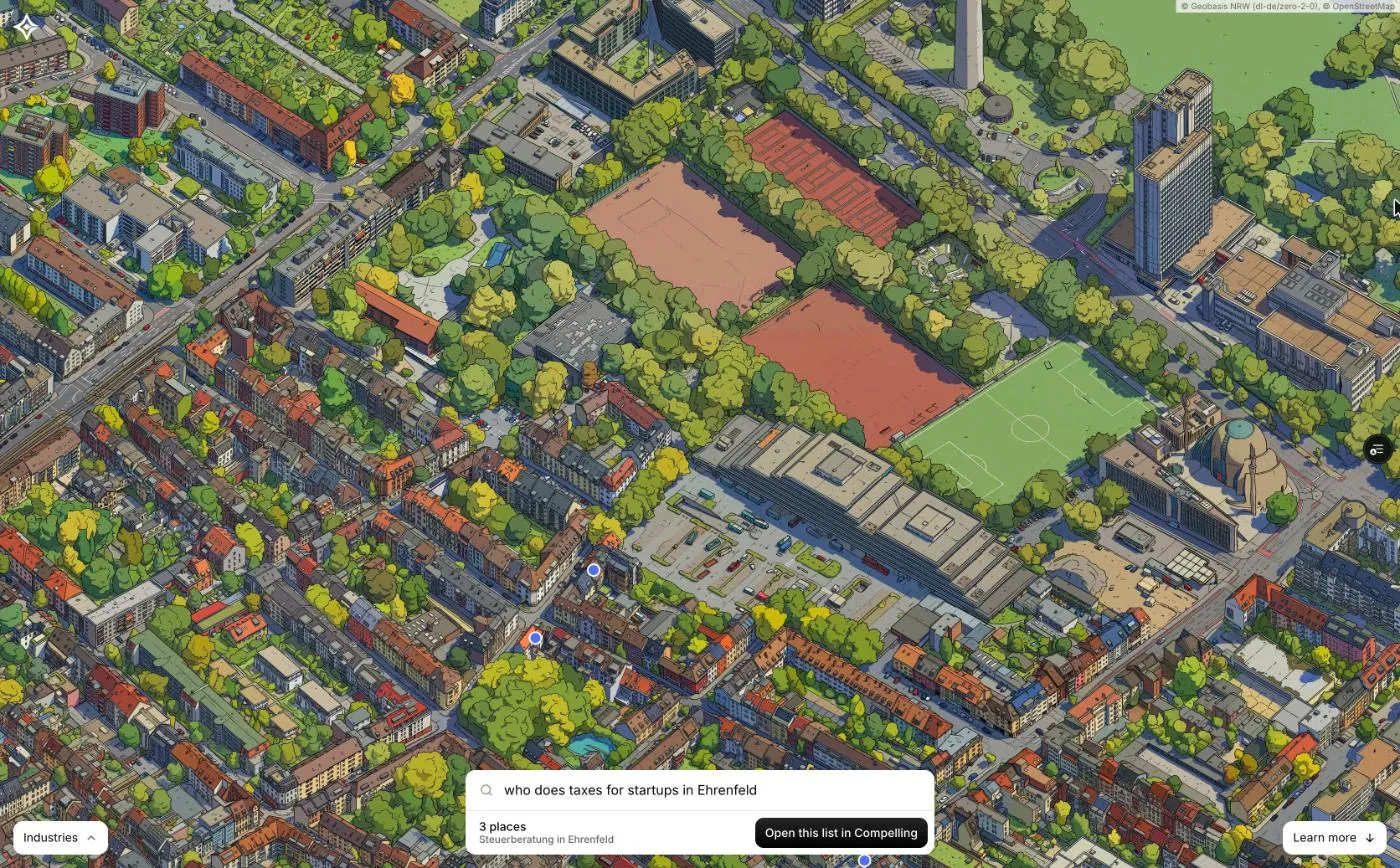
Compelling Places is the clearest example. A map of every company, shop and practice in Cologne, built on 4.9 million places in Germany and 88 million worldwide. You search in plain language (“who does taxes for startups in Ehrenfeld”), a model turns that into categories, keywords and a district, and the map filters. The selection opens in Compelling as a list, ready for contacts and research.
We started it the day before launch, and it took three days. The page is static like everything else. Search and the handoff to the app are two small serverless functions. In Framer, it would have meant a code component on the canvas plus an API hosted somewhere else, with its own deploy.
More of the same:
- 80 templates and a full integrations directory. Facts like category, plan and supported direction live once in code. Copy lives per language.
- Prototyping got fast. We use Emil Kowalski’s prototype skill: the agent builds a few clearly different versions of a section, puts them behind a switcher in the real site, and we pick one by clicking through them. Then it implements the winner and removes the rest. The taste stays with us, and the agent does the typing.
- Link previews are part of the page. A link preview decides whether someone clicks before they see a single word of the page. In Framer, I never thought about them. Now every template and Places generate theirs from the same data as the page, and every guide has its own.
- Pricing has one source. One file generates the pricing page in both languages and /pricing.md for language models. Our app and backend test against the same numbers. If a state exists, it should have a URL you can point an agent at.
What this means for GTM teams
The value of an agent depends on how well it can work inside a system. Reading and writing is the start. Review, automated checks and a way back are what make it safe to let an agent do real work, in your CRM, your lists and your research as much as on your website.
Our website was the system at Compelling where agents worked worst. Now a change to it is a pull request with a preview link and the same checks, whether a person or an agent wrote it.