 Steffen Keßler
At a glance
Conflict: An account from your list matches multiple CRM records, or almost matches one, so you have to choose between Link and Create new.
False match over duplicate: A duplicate can be merged, whereas a false match silently attaches contacts to the wrong account.
Limits of rules and AI: Fixed rules miss on spelling variations, subsidiaries, and namesakes; a language model without context does not know your CRM conventions.
Our approach: We write clear matches on name and domain right away, hold back the 1 to 5 percent of uncertain cases, and ask you.
Decision models and learning: Jev, Clef, and OpenAI’s Decisions API return probabilities for two thresholds, and every decision you make becomes context for the next one (target: around 1 percent).
A CRM conflict occurs when matching a list against your CRM leaves it unclear whether an account already exists there. We built fixed rules first and a language model without context second, and both failed because the right answer depends on your team’s conventions.
With us, our two-stage approach works with HubSpot, Pipedrive, Microsoft Dynamics 365, and monday, and you can build it yourself for any other CRM (section 15).
1. What is a CRM conflict?
A CRM conflict occurs when multiple records are candidates during matching or when one record is only a near match. On a list of 2,000 target accounts for HubSpot, three cases occur:
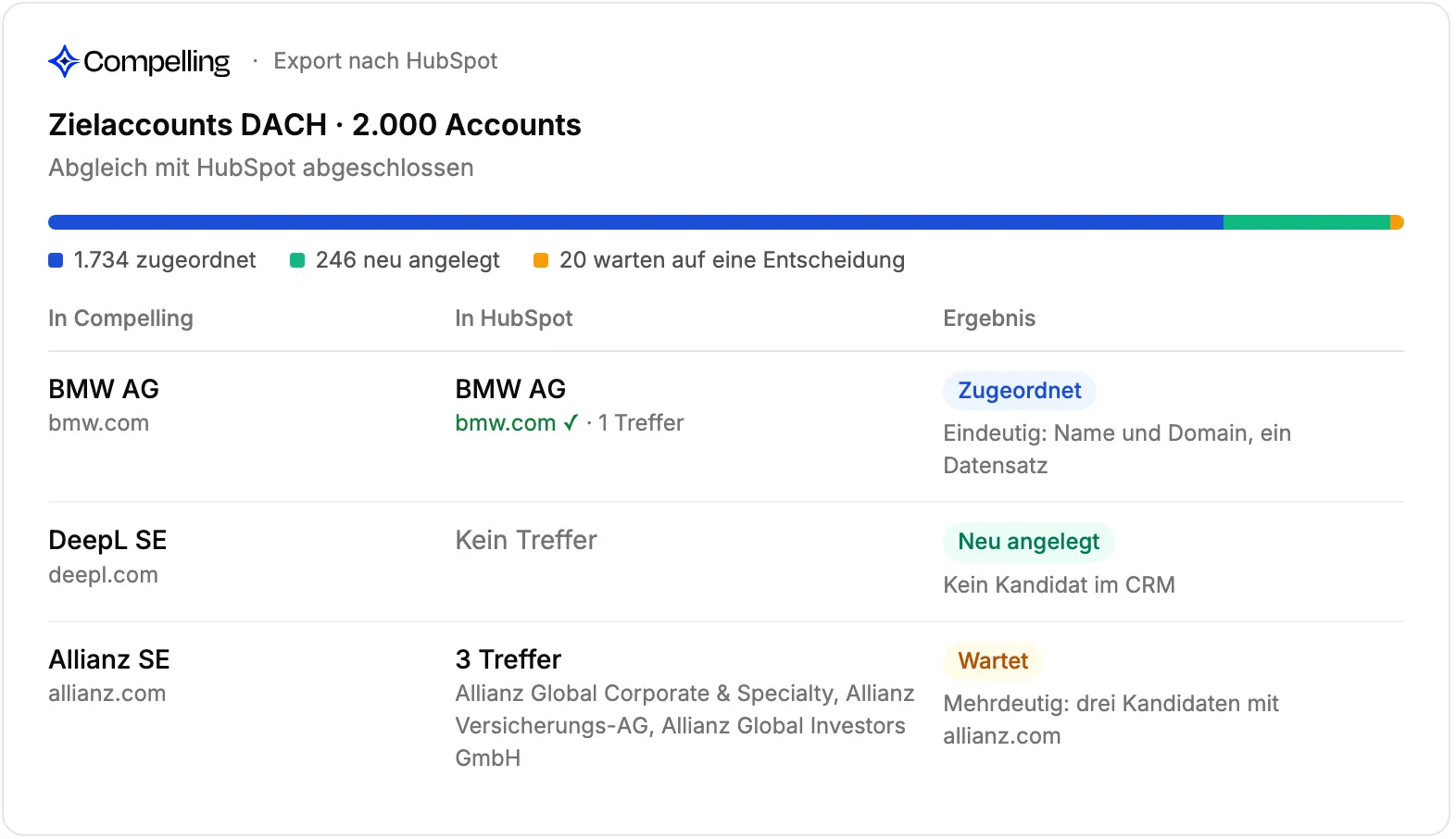
- BMW AG is clear: One record matches on name and domain (bmw.com). We link it.
- DeepL SE has no match: No record is a candidate. We create a new account.
- Allianz SE is ambiguous: Three records share allianz.com. That is the conflict.
The first two cases run without your input. This guide focuses on the third.
2. Which is worse: a duplicate or a false match?
A false match. A duplicate stands out and can be merged; a false match goes unnoticed and later has to be fixed record by record.
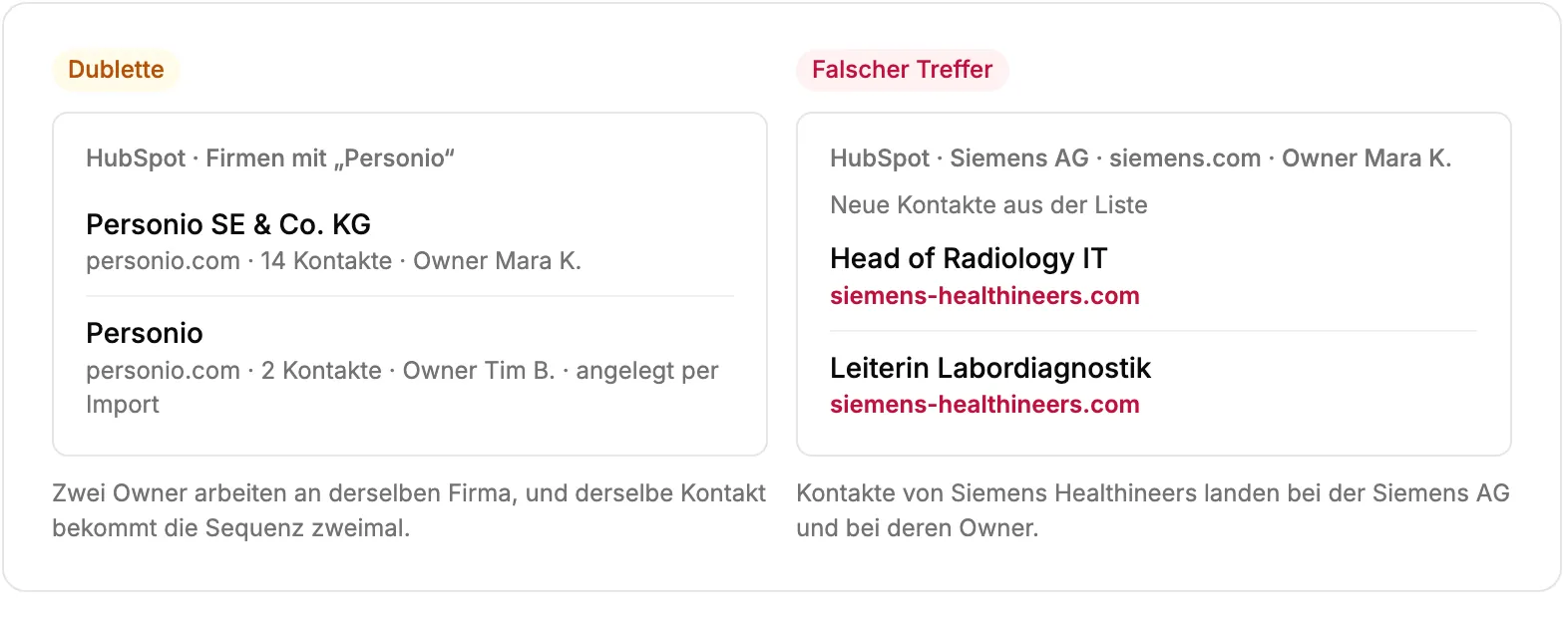
The duplicate. A tool creates “Personio” as a new account even though “Personio SE & Co. KG” already exists. Two owners work the same account, and every week before merging makes the cleanup more expensive.
The false match. Contacts from Siemens Healthineers land on the Siemens AG account along with its owner. This often only surfaces when your sales team pitches Siemens AG on a Healthineers topic.
The legal side. Under Art. 5(1)(d) GDPR, personal data must be accurate. With duplicates, an objection to direct marketing (Art. 21(3)) or an erasure request (Art. 17) often hits only one of the two records.
Our core rule: an open question is better than a silent mislink.
3. Why are fixed matching rules not enough?
Because they only compare words. Whether two records are the same business is not in them. Real cases show where deterministic rules fail:
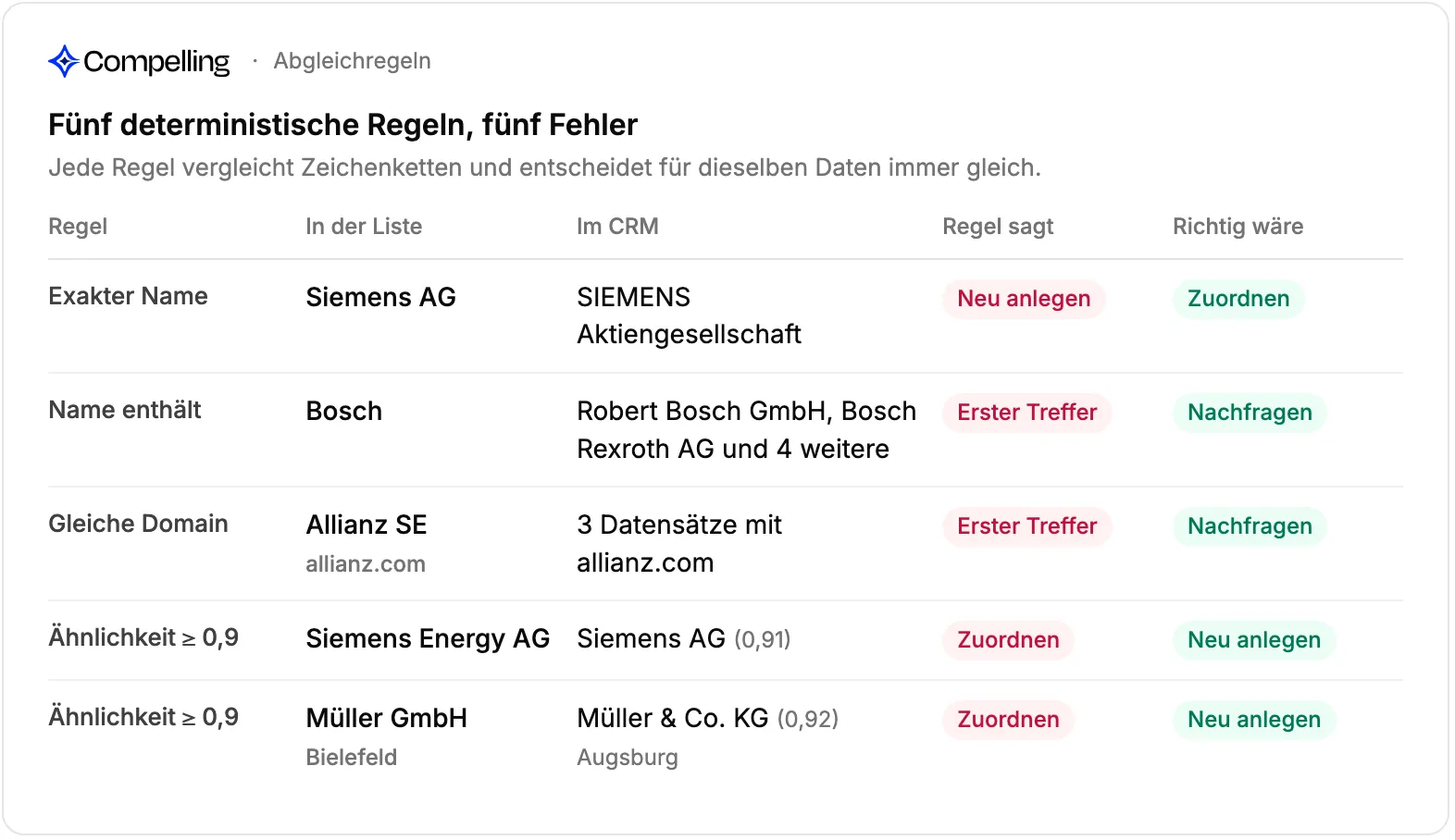
- Exact name treats “Siemens AG” and “SIEMENS Aktiengesellschaft” as two separate accounts and creates a duplicate.
- Name contains and same domain simply pick the first result when multiple records match, such as any one of six entities for “Bosch”.
- Similarity links Siemens Energy AG, independent since 2020, to Siemens AG, or connects two Müller businesses from different cities. Lower the threshold and false matches rise; raise it and duplicates rise.
Soon every rule needed an exception. The real problem: a fixed rule must decide even when uncertain, so it guesses.
CRM rules often do not fire for integrations. According to HubSpot, accounts created via the API are not deduplicated by domain. In Dynamics 365, duplicate detection via Web API and SDK is suppressed by default. Every tool writing to the CRM therefore needs its own matching.
4. Why does a language model without context make the wrong call?
Because it answers a question about the world when the question is about your CRM.
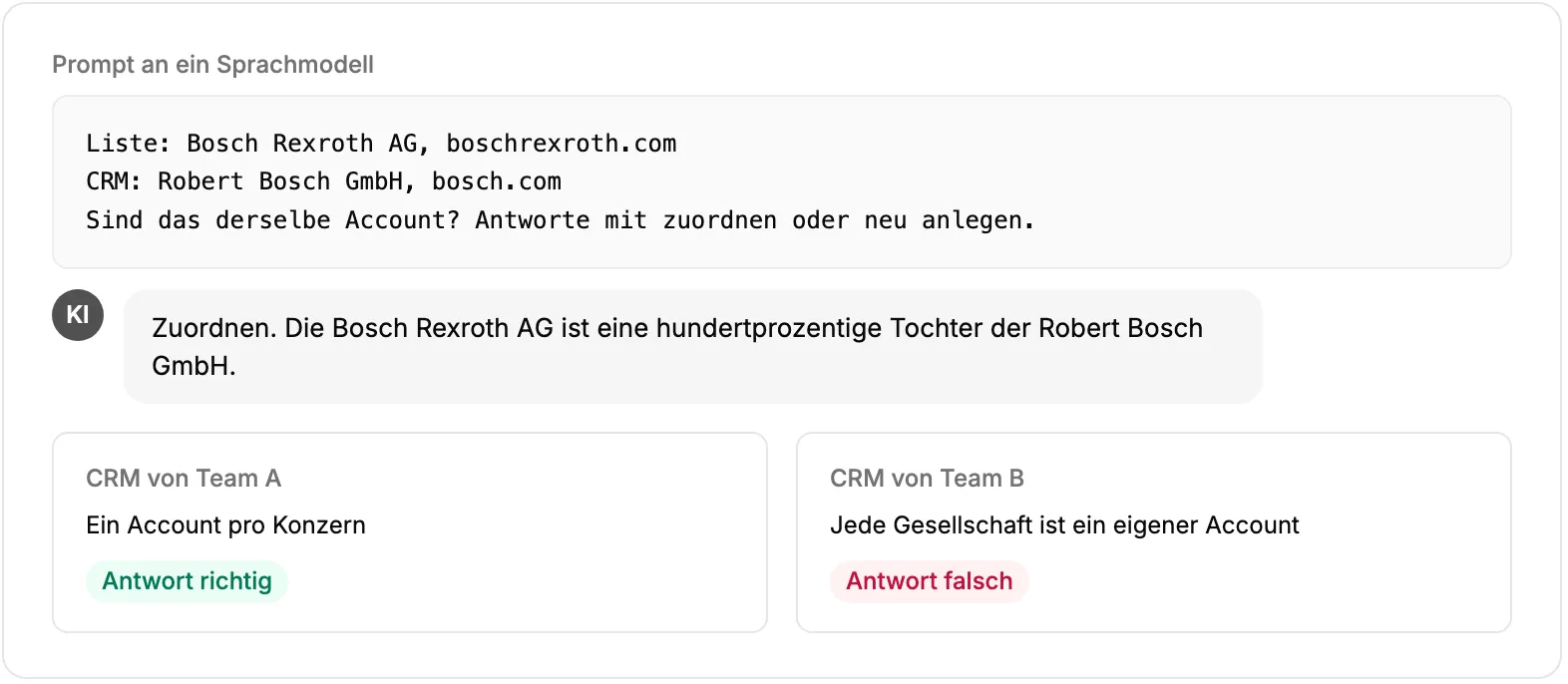
Bosch Rexroth belongs to Bosch. Whether both belong in one account is up to your team: for the exact same input, linking is right for Team A and wrong for Team B. A larger model or a commercial register will not help: no public source shows how your team maintains its CRM.
5. What determines whether two records are one account?
Your team’s conventions.
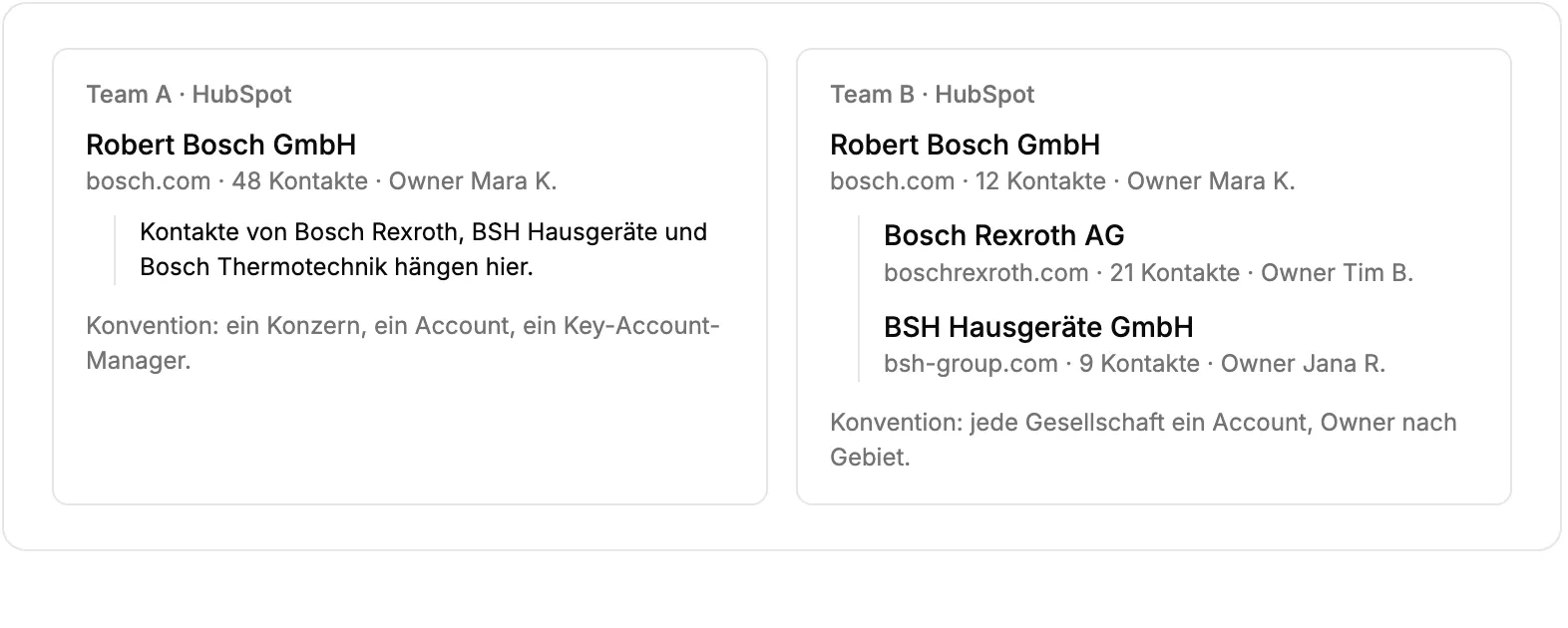
Team A manages the corporate group as one account with a key account manager; Team B manages each legal entity as its own account with an owner by territory. Both are right. The same holds for franchise locations sharing one domain or records intentionally kept separate after a divestiture: name and domain alone cannot settle it.
A person on your team knows the answer right away; a system never does the first time. That is why we ask when uncertain (sections 6 to 8) and feed every answer back as context (section 10).
6. How do we match without guessing?
We write clear matches right away and hold back only uncertain ones. Those stay out of the CRM for now; we store the candidates and notify you.
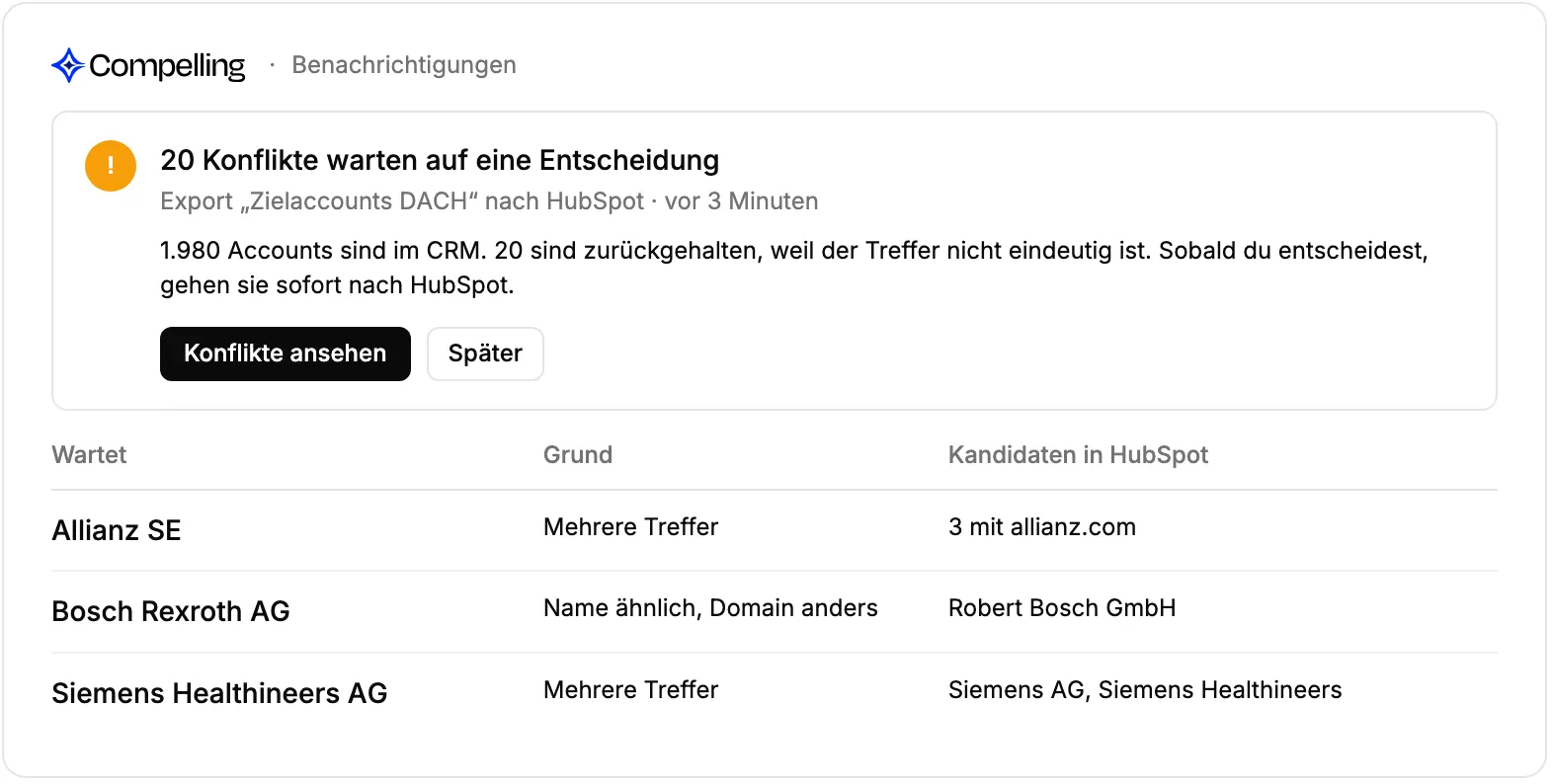
In the example, 1,980 of 2,000 accounts are in HubSpot immediately. You receive the 20 open cases bundled in Compelling and by email with the reason for each; once you decide, the account goes straight into the CRM.
Automatic only on a clear match. We link without asking when a CRM ID is already stored or when exactly one record matches on both name and domain. If no record is a candidate, we create a new account.
Spelling does not matter, and the legal form may be missing on one side (“SIEMENS AG” with www.siemens.com matches “Siemens” with siemens.com). Two different legal forms such as Bosch GmbH and Bosch Ltd count as two separate accounts because they are two legal entities within one corporate group. We identify legal forms using GLEIF’s ISO 20275 list. If the domain is missing on one side, an exact name match including the legal form is sufficient.
Everything in between is held back, including single candidates like Siemens AG with siemens.de or Siemens Energy AG against Siemens AG, where the rules from section 3 would guess.
How many conflicts arise. Across the matches we see, 1 to 5 percent of accounts wait for review, at the upper end when there are many legacy duplicates (section 11). With the learning in section 10, we aim to bring that down to around 1 percent.
7. How do decision models like Jev, Clef, and the Decisions API evaluate a match?
A decision model answers a clearly scoped yes-or-no question in milliseconds with a predefined answer and a probability: are two records the same account, and how sure is the model?
System 1 and System 2. The name comes from Daniel Kahneman’s “Thinking, Fast and Slow”. Language models like ChatGPT work like slow System 2: they generate text word by word, reasoning models think through text beforehand, and the answer always sounds equally confident. Decision models work like System 1: they choose from predefined answers with a probability, without writing a sentence. TypeSafe introduced the first “System One Models” in September 2026 with Jev (70 to 500 ms, calibrated probabilities). Unlike the language model in section 4, they return a number for your threshold.
| Model | Provider | Key features according to provider |
|---|---|---|
| Jev | TypeSafe | calibrated probabilities, 70 to 500 ms |
| Decisions API | OpenAI | question types predicate (probability from 0 to 1), choice, and score, up to 400 questions per request |
| Clef | Cloudflare | open weights under Apache 2.0, API-compatible with Jev |
Two thresholds. Following Ivan Fellegi and Alan Sunter (1969), a pair above the upper threshold counts as a match, below the lower threshold as a non-match, and in between a human reviews it: the exact three cases from section 1. OpenAI recommends setting thresholds based on your own human-labeled examples.
Confident and still wrong. Even a calibrated model can be wrong at 99 percent confidence if it treats a brand and a group entity as identical while your team keeps them separate (section 5). A threshold catches uncertainty. It cannot catch a confident mistake.
Human-in-the-loop. That is why only clear matches run automatically (section 6). In the gray area, a decision model scores the candidates for your decision (section 8), and every choice supplies context as well as rule suggestions (section 10).
8. How do you resolve a conflict in 20 seconds?
Your account from the list appears on the left, with all matching CRM records side by side on the right.
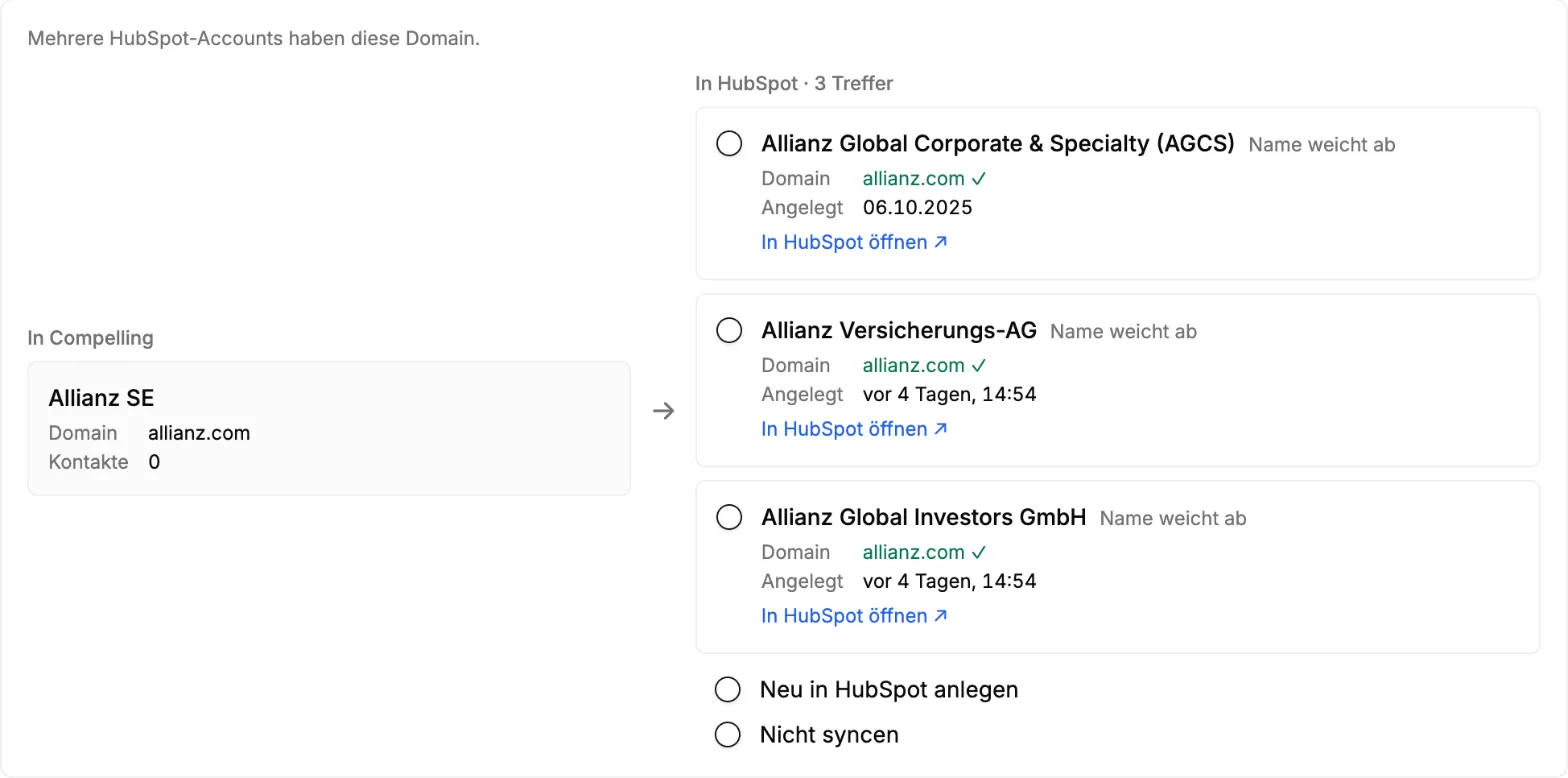
For Allianz SE, you pick the right one of the three HubSpot records with one click. If none fits, you create a new account or exclude it via “Don’t sync”; only that option can be reopened later. Link and Create new write straight to the CRM, so any correction afterward happens there.
9. Who decides, and by when?
The person who knows your CRM conventions, before the next import and within one week at the latest.
Who, when, and in bulk. In small teams, sales leadership decides; in larger ones, RevOps or the CRM owner. Everyone in the workspace receives the notification so nothing sits untouched. Until a conflict is resolved, no fresh signals for that account reach the CRM. Similar cases, such as ten subsidiaries of a corporate group, can be decided in bulk.
With elli. elli, our AI agent, resolves open conflicts directly in chat:
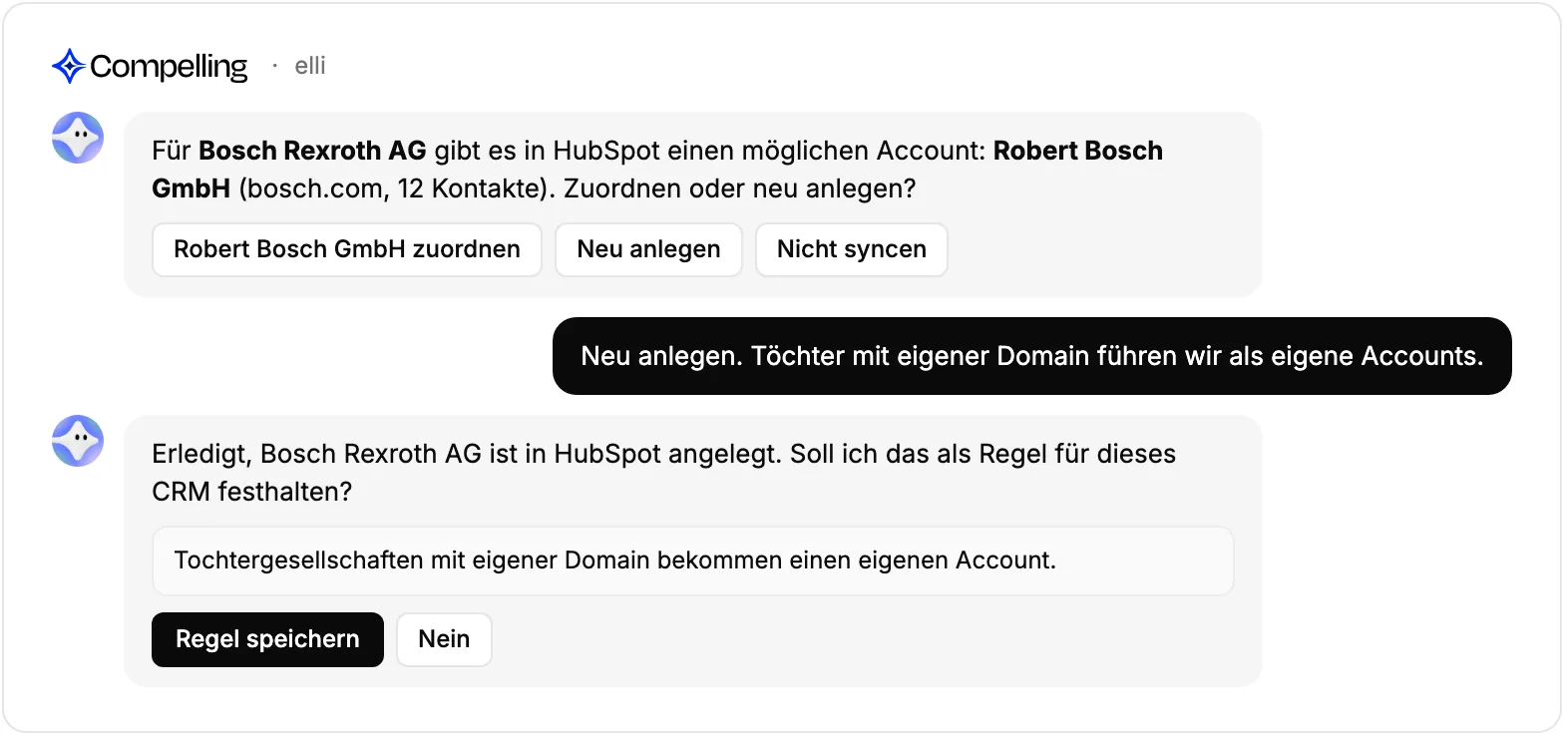
Your reply goes into the same history as the conflict list. From your reason, elli suggests a rule that applies to similar cases only after you adopt it.
10. How does matching improve with every decision?
Every decision is stored along with all options and immediately serves as context for the decision model. So we ask often at first and rarely later.
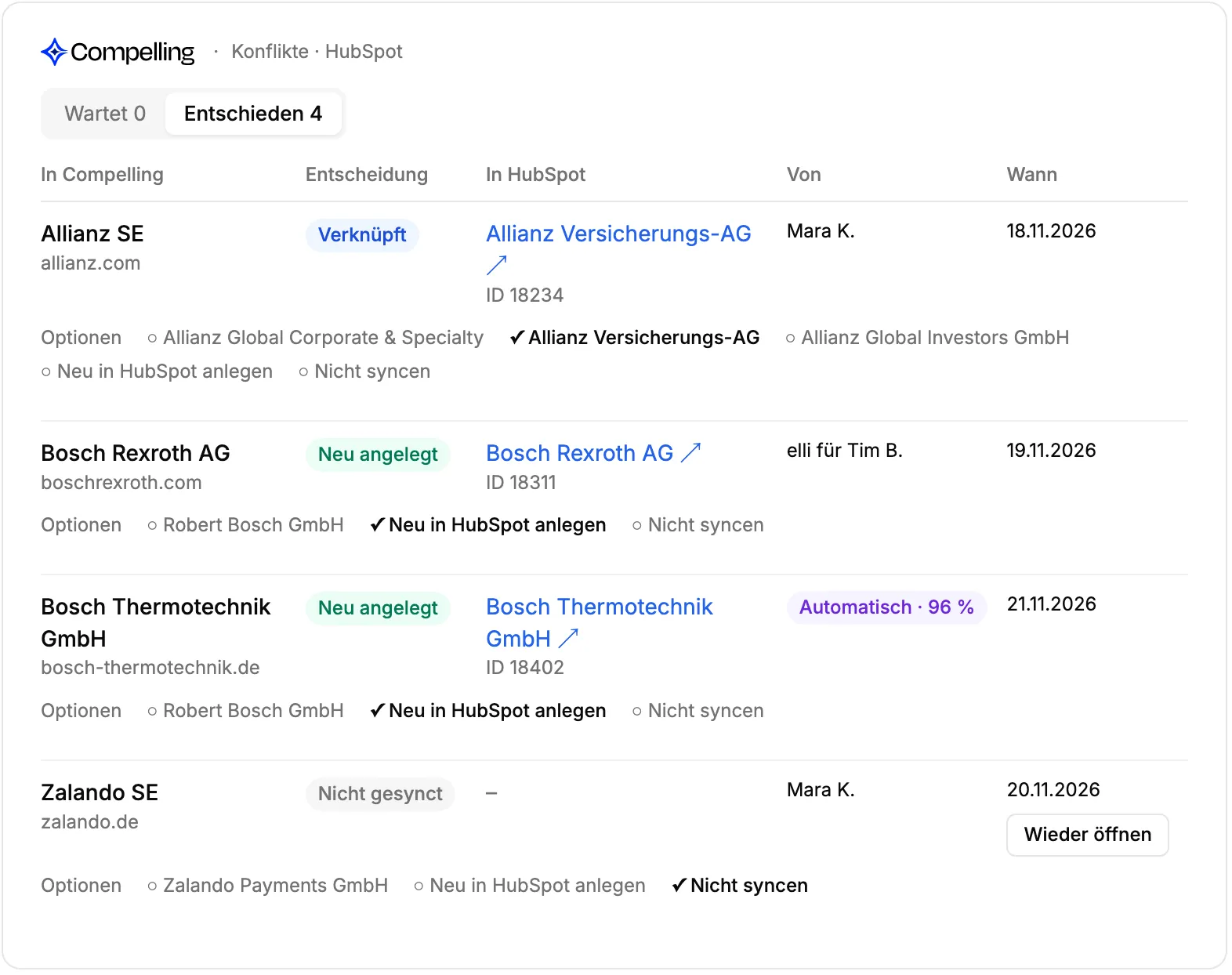
The history records choice, options, person, and time. For Allianz SE, three records and two additional answers were on the table. Pairs of options and choices like these are the exact context that was missing in section 4. We created Bosch Thermotechnik automatically based on two very similar prior cases.
Rule suggestions from patterns. From recurring decisions, we propose readable rules together with example cases. You adopt, edit, or discard them with a click; a rule only participates in decisions once you adopt it. You can add, edit, or delete your own rules at any time, for instance from the template in section 14.
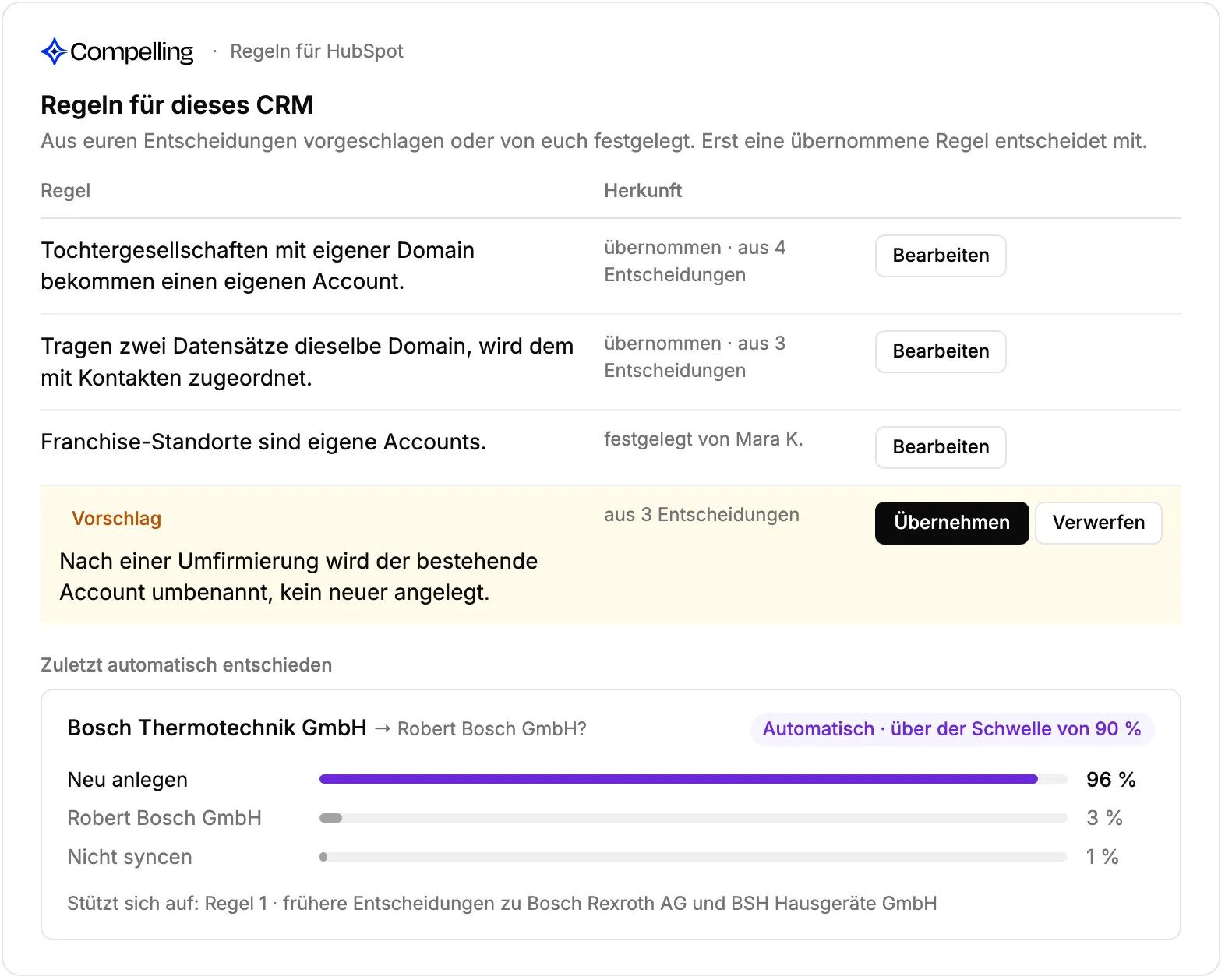
Probabilities instead of guessing. With rules and history in context, the model calculates a probability for each option. For Bosch Thermotechnik, “Create new” reached 96 percent, above our 90 percent threshold, so it ran automatically with supporting evidence; below the threshold, we ask you.
Impact and maintenance. Once legacy duplicates and conventions are settled, we only ask on new cases such as acquisitions, rebrands, or new markets. Review your rules once a quarter, for example after divestitures.
11. How do you clean up duplicates in your CRM?
Merge instead of deleting, and re-point every integration first. That lowers your conflict rate permanently.
Merge instead of deleting. Deleting unlinks or deletes contacts, activities, and deals; merging transfers them to the surviving record. You decide when to merge; if a duplicate is still open after a few days, we remind you. For parent groups and subsidiaries, clarify your convention upfront (section 5).
Re-point integrations first. In our experience, HubSpot redirects merged IDs, whereas Dynamics 365 only deactivates the subordinate record. Where tools do not follow merges automatically, update stored IDs before merging.
Prevent new duplicates. Every integration writing to the CRM needs the same matching logic. You can find more on data quality under data hygiene.
12. How do you measure whether matching works?
By four metrics we track ourselves:
- Conflict rate: Share of waiting accounts per import. It should trend down; if it rises, new duplicates are entering the CRM.
- Time to decision: Median time until resolution. Past one week, sales is missing accounts.
- Share of automatic decisions: Share of uncertain cases resolved via rules and history. It should trend up.
- Corrected links: Links changed after the fact. The target is zero.
Account match rate alone is not enough: you can easily hit a high match rate by blindly linking uncertain matches.
13. The most common mistakes
- Auto-linking on a matching name. With corporate groups, subsidiaries, and namesakes, a similar name is not evidence (section 3).
- Letting a language model decide from name and domain alone. It answers a question about the world rather than about your CRM (section 4).
- Assuming one convention fits everyone. Whether one domain equals one account is decided differently by every team (section 5).
- Halting the entire import. Only the unclear account is held back (section 6).
- Not saving decisions. Otherwise the same question comes back on the next import (section 10).
- Deleting duplicates instead of merging them. Contacts and activities get lost, and stored IDs break (section 11).
14. Template: conventions for your CRM
Your team can use this template to document how it resolves conflicts. With us, you enter the answers as rules so they act as context from the very first match.
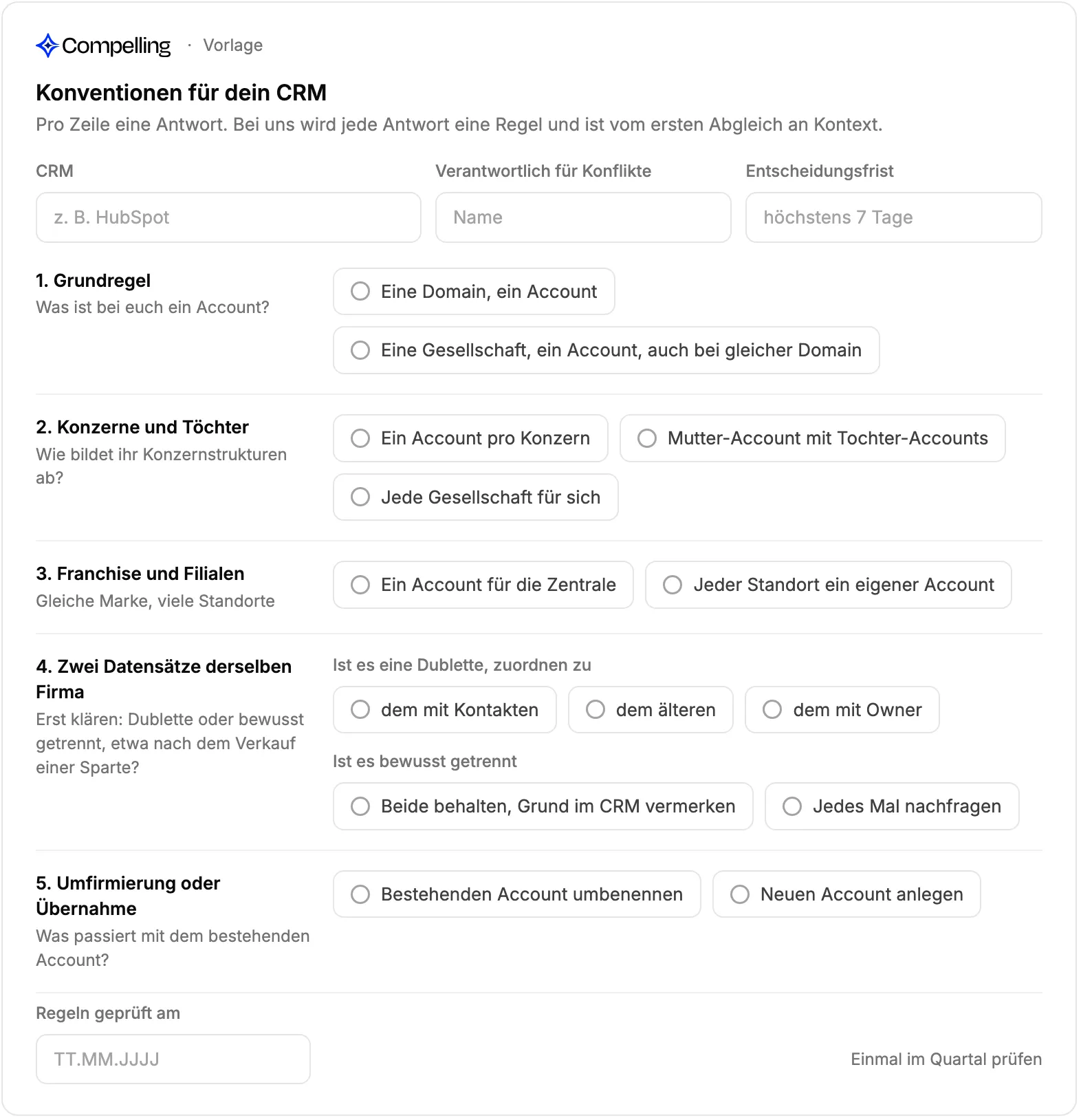
For each row, your team checks one answer, in Compelling or in your wiki. What matters is that the answers are settled before the first match runs.
15. Use it with us or build it yourself
Compelling connects five building blocks, and you can build each one yourself:
- Matching with evidence: Write only on a stored CRM ID or a clear match on name and domain, hold everything else back, and let the rest of the import continue (section 6).
- Conflict list: Decide held-back accounts with reason and candidates individually or in bulk, including notifications (section 8); with us, in Compelling, by email, and via elli.
- History with all options: Store options, choice, person, and timestamp (section 10).
- Readable rules: Adopt rule suggestions from recurring decisions or define your own (section 10, section 14).
- Decision model with threshold: Calculate probabilities with rules and history in context; above the threshold the system decides, below it asks you.
Frequently asked questions
What is a CRM conflict?
A CRM conflict occurs when matching leaves it unclear whether an account already exists in the CRM. Either several records match or one only nearly does.
How do duplicates end up in a CRM?
Most duplicates come from imports and integrations without matching, such as trade show lists, web forms, or outbound tools that create new accounts when unsure. Typos, spelling variations, rebrands, and subsidiaries add to the problem.
Which is worse: a duplicate or a false match?
A false match. A duplicate stands out and can be merged. A false match can overwrite fields on an unrelated account and attach contacts to the wrong one.
Why are matching rules like same name or same domain not enough?
A single typo or spelling variation is enough for an exact rule to miss. Family names like Müller GmbH and Müller & Co. KG can belong to different businesses. Whether subsidiaries or franchise locations are separate accounts depends solely on your CRM conventions.
Can AI reliably detect duplicates in a CRM?
Only with context. From name and domain alone, a language model cannot know your CRM conventions. AI works reliably only with prior decisions, rules, and human review when uncertain.
What are decision models like Jev?
Decision models, also called System One models, answer clear questions in milliseconds with a predefined answer and a probability. Examples include Jev by TypeSafe, Clef by Cloudflare, and the Decisions API by OpenAI. Two thresholds separate automatic linking from human review.
What is human-in-the-loop in CRM matching?
Clear cases run automatically, and a human decides uncertain ones. In record linkage, this corresponds to the Fellegi-Sunter model with match, non-match, and manual review in between. At Compelling, that is the 1 to 5 percent we hold back.
Are CRM duplicates a data privacy issue?
They can become one. Under Art. 5(1)(d) GDPR, personal data must be accurate. With duplicates, an objection to direct marketing under Art. 21 GDPR often applies to only one record.
Sources
- EUR-Lex: Verordnung (EU) 2016/679, Datenschutz-Grundverordnung (section 2)
- HubSpot: Deduplicate records in HubSpot (section 3)
- Microsoft Learn: Run duplicate detection (Microsoft Dataverse) (section 3)
- GLEIF: ISO 20275 Entity Legal Forms Code List (section 6)
- TypeSafe: Introducing System One Models and Jev (section 7)
- OpenAI: Build more responsive apps with the Decisions API (section 7)
- OpenAI: Decisions guide (section 7)
- Cloudflare: Introducing Clef, our open-source decision models (section 7)
- Wikipedia: Record linkage (Fellegi-Sunter model) (section 7)
 Steffen KeßlerCo-Founder & CTO Compelling